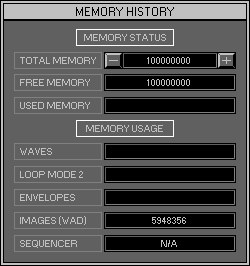
Zone 0, Level 3 (DESKTOP\MEMORY HISTORY)
LEVEL OVERVIEW
Here you can change and View the amount of Memory used by the Space
Station.
Key Features
Memory adjustments, Individually itemised Memory usage.
MEMORY STATUS
Total Memory
Displays the total usable Memory. Win 95 users can change the amount
of usable Memory with the +\- Buttons, click to increment/decrement in
1Mb amounts.
Remember: Leave enough Memory for Win 95 and other application's, removing to much Memory from your operating system slows down its response.
Free Memory
Displays the total Memory available.
Used Memory
Displays the total Memory used.
MEMORY USED
Waves
Displays the total Memory used by Waves.
Loop mode 2
Displays the total Memory used by Loop Mode 2 Cells.
Envelopes
Displays the total Memory used by the Envelope Shapes.
Images (WAD)
Displays the total Memory used by the Graphics Interface.
Sequencer
Displays the total Memory used by the Sequencer. Function not available.
OPTION SCREEN
Displays available Options.
Exit
Exit Memory History (Zone 0 Level 1 Desktop).
Cancel
Exit Memory History (to original location).