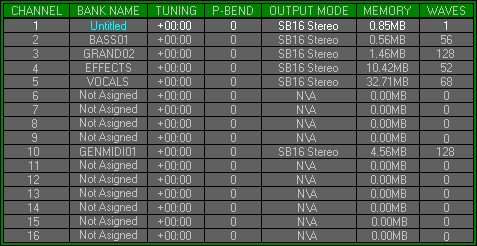
Zone 1, Level 1(EDIT GROUP\BANK ASSIGNER)
LEVEL OVERVIEW
Here you can Assign Banks of Waves to MIDI Channels, change their basic
attributes and save them as a Group. Each entry displays information on
the allocation and contents of the Banks.
Remember: 1-256 WAVES = 1 BANK, 16 BANKS = 1 GROUP
Key Features
Load/Save, Channel Assigning, Bank Naming, Tuning, Pitch Bend, Output
Mode, Memory & Wave Count,
LOAD
Click to activate drop down list.
Load Group
Activates the Load Group window (see Load/Save and Group Files below).
Load Bank
Activates the Load Bank window (see Load/Save and Bank Files below).
Clear Group
Returns the Space Station to its default state, removing all user elements.
Clear Bank
Returns the selected Bank to its default state, removing all user elements.
Replace Bank
Returns the selected Bank to its default state and activates the Load
Bank window.
SAVE
Click to activate drop down list.
Save Group
Activates the Save Group window (see Load/Save and Group Files
below).
Save Bank
Activates the Save Bank window (see Load/Save and Bank Files
below).
CHANNEL
Displays the sixteen available MIDI Channels. These Channels can not
be adjusted.
Remember: Ensure Banks are loaded to the correct Channel.
BANK NAME
Displays the Name of the Bank Assigned to that MIDI Channel. To rename
a Bank, select the desired Channel and click on the Name field.
Not Assigned
MIDI Channel has not been used.
Untitled
MIDI Channel is in use but the Bank has not been Named.
Text in Cyan
Alterations have been made that are not saved.
TUNING
Used to adjust the Tuning of each Bank.
Values
Divided into semitones and cents. Right click to increase and left
to decrease. Hold down the relevant button and click the other for Turbo
mode.
PITCH BEND
Sets up the maximum amount of pitch change for MIDI Pitch Bend.
Values
Measured in semitones. Right click to increase and left to decrease.
OUTPUT MODE
Indicates the current Output Mode.
Stereo
Displays that Stereo Mode is active and panning is possible.
Dual Mono
Displays that Dual Mono Mode is active. At default all odd Channel
numbers will be Output from the Left and all even from the Right, click
to toggle.
MEMORY
Displays the Bank size in bytes.
WAVES
Displays the number of Waves per Bank.
OPTIONS SCREEN
Gives access to Level Jump Gates.
Output settings
Activates Zone 1 Level 2, Edit Group\Output Settings. Determines Quality,
Polyphony and Output Mode.
Output Mixer
Activates Zone 1 Level 3, Edit Group\Output Mixer. Enables full control
of the Sound Blaster Inputs and Outputs.
MIDI Filter
Activates Zone 1 Level 4, Edit Group\MIDI Filter. Enables MIDI data
Filtering and Remapping.
Preferences
Activates Zone 1 Level 5, Edit Group\Preferences. Controls the operating
environment of the Space Station.
LOAD/SAVE
See Load\Save Desktop (no special functions).
GROUP FILES
Contain all data/settings from multiple Space Station Zones\Levels.
There are two types of Group File (see Group Files Zone 0 Desktop).
BANK FILES
Contain all Data/Settings from Zones 2 plus the Channel data from Zone
1.
There are two different types of Bank File, (see below).
Type One (*.BNK)
Contains all of the settings from Edit Bank Zone 2. For Wave Files
only the locations will be saved.
Pros
Smaller file size to enable floppy disk transfer.
Wave files remain on original media to conserve disk space.
Disk Volume Names saved and used to prompt on Loading, if media is
removable.
Ram Doubling Effect where Wave Sample Rate is grater than Output Rate.
Original Wave Sample Rate unaffected by saved Output Rate, stops degeneration.
Cons
Wave data not saved.
Remember: Protect or Backup any Waves and their directory locations.
Type Two (*.BKW)
Contains all of the settings from Edit Bank Zone 2 and the Wave data.
Pros
All elements in one file, allowing easier transfer.
Accelerated load times.
Original Sample Rate unchanged, enabling improvements to Output quality.
Wave quality unaffected by re-saving at lower Output Rates.
Cons
Waves converted on loading will be saved at the current Output Rate.
Remember: Increase Output Rate for Wave loading and decrease for playback. The Ram Doubling Effect will not work if the Output Rate is increased for loading.