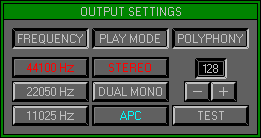
Zone 1, Level 2 (EDIT GROUP\OUTPUT SETTINGS)
LEVEL OVERVIEW
Here you can determine how the Space Station playback engine should
perform. This Level controls Audio Quality, Output Mode, and the total
Waves playable (Polyphony). The performance of the Space Station is processor
dependent, however the Space Station will perform internal tests to determine
the optimum settings for the available hardware.
Key Features
Adjust Frequency, Playback Mode, Polyphony settings, Hardware Testing
FREQUENCY
Controls the playback quality of the Space Station. Adjustments work
in real time without effecting Wave Time/Pitch.
44100HZ
Professional mode, CD quality. Activates the SPDIF connector on the
AWE64 Gold card. This mode has the best sonic capability but uses more
system resources, resulting in lower Polyphony.
22050HZ
Semi professional mode. Activates the RAM doubling effect on 44100HZ
Waves and increases Polyphony. Designed for 486 processors and slow Pentiums.
11025HZ
Amateur mode. Designed for speech applications and 386 machines. Activates
the RAM doubling effect for 44K\22K Waves and offers the highest Polyphony.
PLAY MODE
Controls the Output Mode of the Sound Blaster Card.
Stereo
Enables Stereo Wave playback and dynamic Pan control .
Dual Mono
Enables independent Output control, allowing more flexible use of external
effects and processors,
and vastly improved Polyphony.
APC
Enables the Automatic Pitch Correction Engine, removing quantization
distortion. The APC Engine is Polyphony hungry but is not always necessary.
It is almost impossible to pre-determine when use of the APC will not be
necessary, but there are some instances that are always ok.
One
All Waves to be played back have not been retuned, and do not use any
Pitch varying effects, (MIDI Pitch Bend, Pitch Envelopes or Pitch Modulation).
Two
All Waves have a large harmonic content and do not use Pitch varying
effects.
POLYPHONY
Refers to playing multiple Waves simultaneously.
Value Screen
Displays the maximum desired number of Waves. Click on the + and -
buttons to change the value, however an internal test will be required
to determine the capability of your hardware.
Remember: The maximum Polyphony Value is 128 Waves. A value exceeding
hardware capability causes Output distortion.
TEST
Used to perform internal hardware tests. The Space Station's Test Routine
creates a virtual Wave in RAM, and plays repeatedly while updating the
display. This test determines the Polyphony capability of your Hardware.
Remember: The Test routine takes into account that the user interface
is being accessed in real time,
during MIDI playback only higher Polyphony is possible.
OPTIONS SCREEN
Displays available Options.
Left Output
Sets the total Polyphony for the Left Sound Blaster Output. Dual Mono
only.
Right Output
Sets the total Polyphony for the Right Sound Blaster Output. Dual Mono
only.
Click to increase or use Quick Keys, increasing one will decrease the
other.
Save and Exit
Saves the settings to the Options.dat File and Exits back to Zone 1
Level 1 Edit Group\Bank Assigner.
Cancel
Reverts to previous settings and Exits to previous Zone\Level.