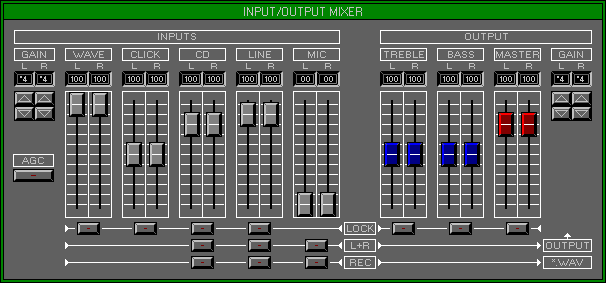
Zone 1 Level 3 (EDIT GROUP\OUTPUT MIXER)
LEVEL OVERVIEW
Here you can adjust the Input and Output levels of the Sound Blaster
card, for accurate matching to external devices.
Key Features
Gain Adjustment, Level Faders, Equaliser, Fader Locking, Muting, Record
INPUTS
Controls Sound Blaster Left and Right Input levels.
Gain
Adjusts Gain for all Inputs (Values *1,2,4,8).
Wave
Adjusts Wave Playback, click on Fader and move.
Click
Adjusts Click (OPL3 and AWE Wave Table) Playback.
CD
Adjusts CD Audio Playback.
Line
Adjusts External Line Input.
Mic
Adjusts External Microphone Input.
Automatic Gain Control (AGC)
Automatically adjusts Gain for the Microphone Input. This will help
avoid audio signal clipping.
OUTPUTS
Controls the Sound Blaster Output level and Tonal quality.
Bass
Adjusts Bass Output.
Treble
Adjusts Treble Output.
Master
Adjusts the overall Output of the Sound Blaster.
Gain
Adjusts Gain for all Outputs (Values *1,2,4,8).
LOCK
Synchronises Faders ensuring a stereo match.
L+R
Mutes Input removing unnecessary noise.
REC
Routes Input to Wave Recorder.
OPTIONS SCREEN
Displays available Options.
Hold
Stores all current settings to disk, use with Fetch for undo.
Fetch
Reverts to previously Held settings.
Save + Exit
Saves the settings to the Mixer.dat File and Exits back to Zone 1 Level
1 Edit Group\Bank Assigner.
Cancel
Reverts to previous settings and Exits to previous Zone\Level.