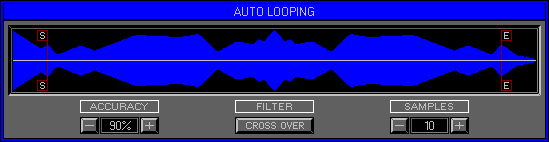
Zone 2 Level 5 (EDIT BANK\AUTO LOOPING)
LEVEL OVERVIEW
Here you can Automatically detect Loop Start\End points with Extreme
Accuracy. Most Samplers have Auto Loop facilities but few if any are quite
like the Space Station. Sample Editors such as Avalon for the Atari use
similar techniques but not during Audio Playback. Auto Looping within the
Space Station is capable of finding Glitch Free Loop Points within any
Wave, but due to the nature of Sound not all Results will be desirable.
Natural and Synthetic Waveforms have individual characteristics, experience
with different Wave types will aid Loop Point finding, but generally satisfactory
results can be achieved.
Remember: Loop Choice, Direction and Stereo Display Mode are set form Zone 2 Level 4 Edit Bank\Loop Mode 1.
Key Features
Wave Display, Auto Point Finding, Accuracy, Filter, Samples.
WAVE DISPLAY
Displays the entire Wave plus the Loop Start and End Pointers. Pointers
update during Wave Playback.
Central marker turns red to Display Play Location.
Start Point
Location of Loop Start Point, left click within Display or click\drag
to move Pointer.
End Point
Location of Loop End Point, right click within Display or click\drag
to move Pointer.
Pointers
Auto detect the closest point to the desired position within the User
Values set. Results are Displayed in the Status Screen. Large User Values
and slow CPU's result in longer response times, Waves continue to Loop
around the last positions.
Remember: Loop Start and End Pointers can not be reversed.
ACCURACY
Defines the level of Accuracy tolerated for a good result.
Values
Click +\- Buttons to up\down the Value. Values of 100% are not unthinkable
but are generally unrealistic,
in practice Values between 80-90% will give good results.
FILTER
Defines the type of point to find within a Wave. Successful Looping
relies heavily on both
the Start and End Pointers residing on Zero Values.
Remember: Audio signals oscillate both positive and negative around a Zero level.
Cross Over
All audio signals will at some point cease to be positive and start
to be negative, or visa versa.
The point between this change is the Zero Cross Over,
a true Zero Value. Generally this type of Filter will give the correct
results,
but when dealing with Phase Shifting Waves and Alternate Looping, clipping
will probably occur.
Zero
All audio signals have positive and negative ripples, between these
ripples there will be Zero points.
When dealing with Alternate Looping, using a Cross Over Filter gives
bad results because Waves will Play a full positive\negative ripple in
one direction, then the next. Zero Filters allow Points to be placed within
a ripple,
enabling a Wave to play part of the positive\negative ripple, then
back on itself creating a full ripple.
This type of Filter should help remove audio clipping.
SAMPLES
Digital audio signals contain thousands of positive and negative voltages
known as Samples.
The amount of which depends upon the Wave length and Sample Rate. Using
Samples as part of the search,
defines an area immediately after the Start Point or before the End
Point to match.
Values
Click +\- Buttons to up\down the Value. Large Sample Values will cause
longer delays in Point finding,
but when Looping the ambient tail end of a Wave, good results can be
found quickly.
Remember: Every Sample Value is subjected to the Accuracy Value.
OPTION SCREEN
Displays available Options.
Keep And Exit
Keeps Choice and returns to Loop Mode 1.
Cancel
Removes Choice and returns to Loop Mode 1.
Save Choice And Exit
Keeps Choice and Exits to Zone 2 Level 1 Edit Bank\Wave Assigner.
Cancel
Remove amendments and Exit Auto Loop (to original location).