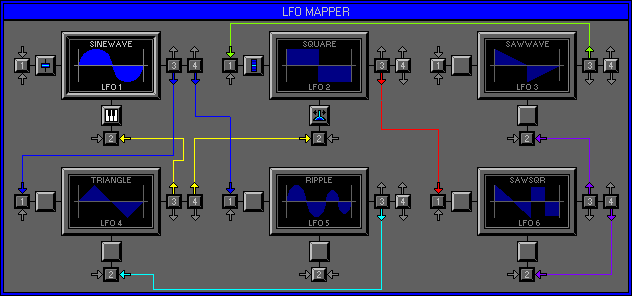
Zone 2 Level 9 (EDIT BANK\LFO MAPPER)
LEVEL OVERVIEW
Here you can Assign MIDI Controllers to LFO Depth and Time for hand
on effects. LFO Modules have both Inputs and Outputs used to Map Shapes
together for Cross Modulation and Time Acceleration effects.
Key features
LFO Modules, Shape Displays, LFO Mapping, MIDI Controller Assigning,
Controller Icons,
Colour Coding Mapping Points, Loading\Saving.
LOAD
Click to activate drop down list.
Load LFO
Activates the Load LFO window (see Load/Save Zone 2 Level 7 LFO Assigner).
Load LFO Map
Activates the Load LFM window (see Load/Save Zone 2 Level 7 LFO Assigner).
SAVE
Click to activate drop down list.
Save LFO
Activates the Save LFO window (see Load/Save Zone 2 Level 7 LFO Assigner).
Save LFO Map
Activates the Save LFM window (see Load/Save Zone 2 Level 7 LFO Assigner).
LFO MODULES
Primarily divided into Three sections, LFO Modules have a Shape Display,
four Mapping Points and two MIDI Controller Assign Points (MCAP).
SHAPE DISPLAYS
Each display has three Modes. Left click to select.
Mode 1
Out and blank, LFO not Active (see Zone 2 Level 7 Edit Bank\LFO Assigner).
Mode 2
Out and Shape Dark Blue, LFO Active but not selected. Click to select.
Mode 3
In and Shape Blue, LFO Active\Selected.
Name
Current LFO File Name.
Shape
Current LFO Shape.
LFO 1-6
Current Active LFO Module.
Connections
Inside each Display are Six LED's to indicate LFO Connections, three
Upper and three Lower.
Upper
LFO is connected.
Lower
Selected Wave is connected.
Red
Connected to Volume.
Green
Connected to Pan.
Cyan
Connected to Pitch.
MAPPING POINTS
LFO Modules have two Types of Mapping Points. All Points have Direction
Arrows that Illuminate on Mapping.
Each Module has its own Mapping Colour.
Input Points (Type One)
Each LFO Module has two Cross Modulation Inputs, Switch 1 for Mapping
to Depth, and Switch 2 for Mapping to Time.
Arrow (Grey)
Not Mapped.
Arrow (Blue)
Mapped to LFO One Output.
Arrow (Red)
Mapped to LFO Two Output.
Arrow (Green)
Mapped to LFO Three Output.
Arrow (Yellow)
Mapped to LFO Four Output.
Arrow (Cyan)
Mapped to LFO Five Output.
Arrow (Purple)
Mapped to LFO Six Output.
Output Points (Type Two)
Each LFO Module has two Output Points Switches 3 and 4 which are used
for Mapping.
Click to Activate\Deactivate Output, click LFO Module Input to Cross
Modulate.
Remember: Only the selected LFO Module can be used for Output Mapping.
CROSS MODULATION
As with Waves LFO Shapes can be used to Modulate themselves or others
using Mapping Points
(see Mapping Points above).
Depth (Input 1)
Mapping to Input Point 1 allows the Output Shape to Modulate the Global
Depth Value of the Input Shape
(see Input Mix Zone 2 Level 7 Edit Bank\LFO Assigner).
Time (Input 2)
Mapping to Input Point 2 allows the Output Shape to Modulate the Global
Time Value of the Input Shape
(see Input Mix Zone 2 Level 7 Edit Bank\LFO Assigner).
LFO Shapes Global Speed can only increase (see Time Acceleration below).
MCAP
LFO Modules have two MIDI Controller Assign Points, one for Depth and
Time.
Each Point has four different Icons for displaying the current Option.
Depth
Single left\right click to Scroll through available Options.
Grey Square
MIDI Controller Not Attached, LFO Modulates at all times.
Fader Icon
Fixed MIDI Controller Assigned (see Controller List Zone 1 Level 4
MIDI Filter).
Mod Wheel Icon
Modulation Assigned MIDI Controller (01).
Keyboard Icon
After Touch Assigned.
Remember: LFO Shapes will not Modulate Waves until receiving Values from the Assigned MIDI Controller.
Time
Single left\right click to Scroll through available Options.
Grey Square
MIDI Controller Not Assigned, LFO Time not Modulated.
Fader Icon
Fixed MIDI Controller Assigned (see Controller List Zone 1 Level 4
MIDI Filter).
Pitch Bend Icon
Pitch Bend Assigned (see Time Acceleration below for Special Function).
Keyboard Icon
After Touch Assigned.
Remember: LFO Time Acceleration will not commence until receiving Values from the Assigned MIDI Controller.
TIME ACCELERATION
LFO Time can be Increased\Decreased by MIDI Controllers or LFO Shapes.
To Accelerate a Shapes Time correctly two Values are need.
Value One (Minimum Time)
Set by the Global LFO Speed (see Zone 2 Level 7 Edit Bank\LFO Assigner).
Value Two (Maximum Time)
Set by the Global LFO Variant (see Zone 2 Level 7 Edit Bank\LFO Assigner).
Special Function
When Pitch Bend is Assigned to Time the current LFO Speed will increase
to 50% of the Maximum Time Value. Positive\negative Pitch Bend Values increases\decrease
LFO Speed.
OPTION SCREEN
Displays available Options.
Hold
Stores all current settings to disk, use with Fetch for undo.
Fetch
Reverts to previously Held settings.
Keep and Exit
Keeps Module Mapping and Exits to Zone 2 Level 7 Edit Bank\LFO Assigner.
Cancel
Removes all Mapping and returns to the previous Zone\Level.