MAIN MIXER
Zone 5, Level 1 (MIXER\MAIN MIXER)
LEVEL OVERVIEW
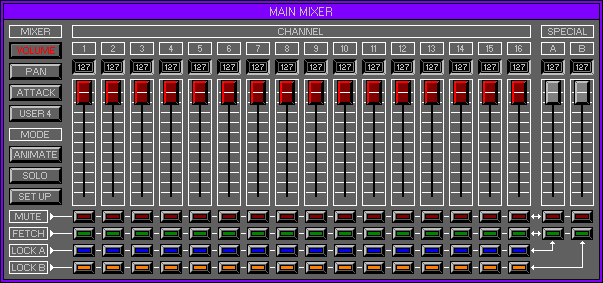
Here you can adjust the Main Volumes, Pan positions and the Amplitude
Envelopes Attack and Release Times,
for each individual MIDI Channel. Channels can be locked together to
enable multi Fader adjustments.
Animation Mode for on screen movement.
Key Features
Individual Channel adjustment, Fader Animation, Muting, Fetching and
Locking,
MIXER
Switches between the four available Main Mixers.
Volume
Sixteen Main Volume Faders (Control Change 7) one for each MIDI Channel.
Use Faders to increase/decrease the Volume of the selected Channel.
Pan
Sixteen Pan Faders (Control Change 10) one for each MIDI Channel.
Use Faders to control the left and right balance of each Channel.
Attack
Sixteen Attack Faders (Control Change 12) one for each MIDI Channel.
Use Faders to control the Amplitude Envelopes Attack Time. No effect heard
if Points are not set! (see Fixed Pointers Zone 2 Level 3 Edit Bank\Envelope
Generator).
Release
Sixteen Release Faders (Control Change 13) one for each MIDI Channel.
Use Faders to control the Amplitude Envelopes Release Time. No effect heard
if Points are not set! (see Fixed Pointers Zone 2 Level 3 Edit Bank\Envelope
Generator).
CHANNEL
Each of the sixteen MIDI Channels within the Space Station have been
allocated with a Current Value Screen,
Fader and four Switches.
Current Value Screen
Displays the Value for each Channel at all times, reflecting all MIDI
changes.
Fader
Left click\drag, up/down to change current Value. Fader Values will
be transmitted internally
and externally to adjust each Channel.
Remember: The type of Data sent depends on the current active Mixer
Switches
Each Channel has four switches, each of which functions differently.
Mute
Mutes the Volume of the current Channel.
Fetch
Recalls the current Channels last Held position (see Option Screen
below).
Lock A
Locks the current Channel to Special A for Multi Fader movement (See
below).
Lock B
Locks the current Channel to Special B for Multi Fader movement (See
below).
SPECIAL
Channels A and B have been designed to adjust all Locked Faders.
Current Value Screen
Displays the current Value for each Special Channel.
Fader
Special Faders react slightly differently from the Channel Faders,
enabling the movement of different Channel values.
Click Fader and drag up/down to move all Locked Channels. Special Faders
may reach their maximum/minimum Value,
whilst the Locked Faders have not reached theirs. To enable more Fader
movement simply release click,
and click again anywhere within the Special Faders path but not on
the Fader itself.
This will define the Special Faders new position without moving any
of the Locked Channels,
then move the Fader as before.
Remember: all of the Channel Faders can have different Values, the offsets
between these
Values will be retained even after all of the Channels have been maximised
or minimised.
Switches
Each Special Channel has two Switches.
Mute
Mutes the Volumes of all Locked Channels.
Fetch
Recalls the last Held positions of all Locked Channels.
MODE
Animate
Fader Animation displays all MIDI value changes. Faders can still be
used to transmit Data as before, but during user movement all Animation
stops.
Remember: The Mouse Pointer will start to blink as the Faders Animate.
Solo
Mutes the Volumes of all MIDI Channels with the exception of the selected
Bank.
This will enable the ability to monitor the currently selected Channel
only.
Setup
Activates the Joystick port Calibration Screen for use with the Hypnosis
Studio external Mixer controller. Function currently not available.
OPTIONS SCREEN
Displays available Options.
Hold
Stores all current settings to disk, use with Fetch for undo.
Fetch
Reverts to previously Held settings.
User Mixer
Activates the User Mixer (Zone 5 Level 2 Mixer\User Mixer).
Mixer Designer
Activates the Mixer Designer (Zone 5 Level 3 Mixer\Mixer Designer).