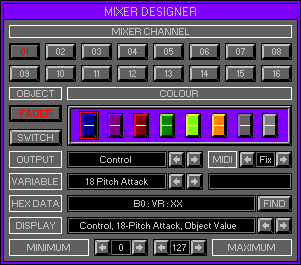
Zone 5, Level 3 (MIXER\MIXER DESIGNER)
LEVEL OVERVIEW
Here you can assign Attributes to each of the sixteen User Fader and
Switches.
All types of MIDI Data Can be sent including System Exclusive.
Key Features
Channel selecting, Object assigning, Colour selecting, Attribute assigning.
LOAD
Click to activate drop down list.
Load User Mixer
Activates the Load User Mixer window (see Load/Save and Mixer Files
below).
SAVE
Click to activate drop down list.
Save User Mixer
Activates the Save User Mixer window (see Load/Save and Mixer
Files below).
MIXER CHANNEL
Switches between the sixteen available Mixer Channels.
Buttons (1-16)
Selects the Mixer Channel for Attribute Editing.
OBJECT
Selects between the User Fader and Switch, left click to select, right
to deactivate.
Switch out and not coloured
Object not Assigned.
Switch depressed and coloured
Object is active.
Switch out and coloured
Object is assigned.
Fader
Assigns a Fader to the current Mixer Channel and activates the Attribute
options.
Switch
Assigns a Switch to the current Mixer Channel and activates the Attribute
options.
COLOUR
Displays the eight different User Colours available for the selected
Object.
Each Object has two different Types, Latching and Non Latching.
Left click to select a Colour, Type Latching (red highlight).
Left/right click to scroll through available Types, (Latching/Non Latching).
Latching (red highlight)
This forces the Object to stay at its current position, after left
release.
Non Latching (green highlight)
This forces the Object to return to the centre, after left release.
Faders only.
Non Latching (orange highlight)
This forces the Object to return to zero, after left release. Switches
pop out.
Non Latching (yellow highlight)
This forces the Object to return to maximum, after left release. Faders
only.
OUTPUT
Displays the currently selected MIDI Event Type to be transmitted by
the Object.
Click direction buttons to scroll through available Events, (see MIDI
Events below).
VARIABLE
Displays the exact Attribute within the MIDI Event Type to be Transmitted
by the active Object, click to scroll through available Variables (see
MIDI Events below).
MIDI
Displays the current MIDI Channel for the active Object, click to scroll
Options.
1-16
Defines the exact MIDI Channel to transmit on.
Multi
Up to five different MIDI Channels can be used together.
Use the Multi Channel input screen to select up to Five Options, right\left
click to up/down the Options.
All
All MIDI Channels will be used.
Fix
Uses the selected MIDI Channel.
HEX DATA
Displays up to fifteen Hexadecimal dual nibble bytes that create a
MIDI Event.
To change a Value use right\left clicks to scroll through the List.
Value List
Starts with No Entry, then scrolls through all of the possible Hexadecimal
numbers.
After the Hexadecimal list there are four Special Options.
XX
Active Objects Value.
VR
Variable.
CS
Check Sum Value (For some Roland Devices).
F7
System exclusive End. (Must always terminate a System Exclusive Event).
DISPLAY
Displays the Hexadecimal Data in English and Decimal.
Use the Left\Right Buttons to scroll through the Text.
FIND
Auto Detects incoming MIDI Data Events, deactivate to keep. All Data
received will be displayed, even the MIDI
Channel. It is important to have a good knowledge of MIDI Data to make
effective use of the Find function.
Remember: Send one MIDI Data Event Value only, this will stop Data Over
Runs.
If a Data Over Run occurs, more Bytes than are needed will be found.
To remove a Data Over Run activate Find again,
or delete the extra Bytes by replacing them, with a No Entry Value
from the Value list.
MINIMUM
Displays the Minimum Value the current Object Transmits.
Use the Right\Left Buttons to increase or decrease the Value.
MAXIMUM
Displays the Maximum Value the current Object Transmits.
Use the Right\Left Buttons to increase or decrease the Value.
OPTIONS SCREEN
Displays available Options.
Hold
Stores all current settings to disk, use with Fetch for undo.
Fetch
Reverts to previously Held settings.
Main Mixer
Activates the Main Mixer (Zone 5 Level 1 Mixer\Main Mixer).
Mixer Designer
Activates the Mixer Designer (Zone 5 Level 3 Mixer\Mixer Designer).
LOAD/SAVE
See Load/Save Desktop (no special functions).
MIXER FILES
Contain all data/settings from Zone 5 Levels 2 and 3.
MIDI EVENTS
Output
Control Change.
Variable
Controllers 0 - 128.
Output
Program Change.
Variable
N/A.
Output
After Touch.
Variable
N/A.
Output
System Exclusive.
Variable Normal
Data Byte not converted.
Variable 14 bit Korg
Data Byte converted into 14 bit bi-polar, allowing + and - values.
Variable Full Nibble
Data Byte converted into 2 Nibbles allowing for values of 0 -255.
Variable Half Nibble
Data byte converted into 2 Nibbles allowing for values of 0-127.
Variable Lex1 & Lex2
Used to control the Lexicon LXP-1.
Output
MIDI Time Code (MTC).
Variable
N/A.
Output
Song position.
Variable
N/A.
Output
Song Select.
Variable
N/A.
Output
Unknown.
Variable
N/A.
Output
Unknown.
Variable
N/A.
Output
Tune Request.
Variable
N/A.
Output
Clock.
Variable
N/A.
Output
Unknown.
Variable
N/A.
Output
Start.
Variable
N/A.
Output
Continue.
Variable
N/A.
Output
Stop.
Variable
N/A.
Output
Unknown.
Variable
N/A.
Output
Active Sensing.
Variable
N/A.
Output
System Reset.
Variable
N/A.
Output
Note Off.
Variable
Note value 0 - 127.
Output
Note On.
Variable
Note value 0 - 127.
Output
Poly Pressure.
Variable
Note value 0 - 127.