SHIP NAVIGATOR
Zone 6, Level 1 (NAVIGATOR\SHIP NAVIGATOR)
LEVEL OVERVIEW
Here you can view all of the Zones and Levels within the Space Station
and Teleport directly to them.
Key Features
Level Names displayed when hovering, Teleporting, Jump Storing
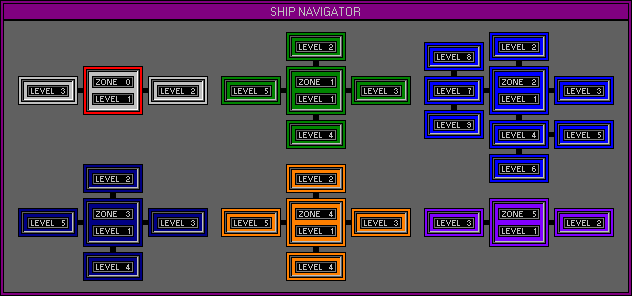
ZONES
Desktop
Three Levels are available.
Edit Group
Five Levels are available.
Edit Bank
Nine Levels are available.
Edit Wave
Five Levels are displayed but none are available in this version.
Sequencer
Five Levels are displayed but none are available in this version.
Mixer
Three Levels are available.
LEVEL NAMES
Move the mouse over a Level and its Name will be displayed in the Status
Screen.
TELEPORTING
Activate a Jump Gate by left clicking on the Level.
JUMP GATES
Up to four Jump Gates can be stored at any one time for quick Jumping.
Storing Jump Gates.
To store a Jump Gate simply use the following F keys.
F9
Stores the current location on the F5 key.
F10
Stores the current location on the F6 key.
F11
Stores the current location on the F7 key.
F12
Stores the current location on the F8 key.
Pressing F5, F6, F7 or F8 will activate the stored Jump Gate.
OPTION SCREEN
Displays available Options.
Space Station
Displays information on the Space Station (Names, Number & Protections)