| NAVIGATOR |
Ship Navigator
The least amount of clicks
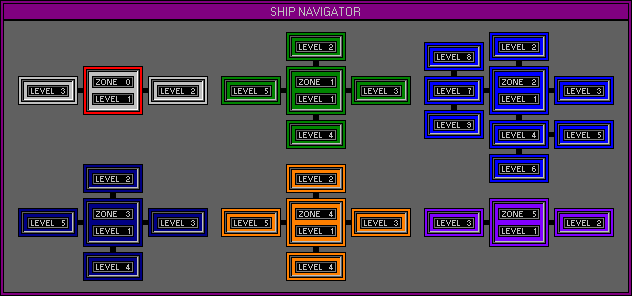
has become the Space Station developers guide, and due to this the Navigator
was designed. Every Level within the software can be viewed together
in a simple map style layout using one click. Current location is
displayed by a red highlight, and any Level can be Jumped to using one
click. Up to four of these Jumps can be stored and activated using
Quick Keys.
Help Navigator
When Help is needed and
its bad enough to actually read some thing, then and only then do you actually
experience the endless cycle of nonsense, commonly known as Help
Files. The Space Stations Help Navigator will only give access to
files relating to the active Level. All of Function Headings and
the individual Functions within each Level can be listed by using
the Search Navigator. All of the Help Files have been written by
the Interface Design Manager, if you experience difficulty using any part
of the Space Station do not hesitate to Email For a full listing
on the Navagator functions, refer to the online manual or download it in
PDF or HTML formats.